顯示具有 Others 標籤的文章。 顯示所有文章

2016年3月29日 星期二

Open Letter by Tsai Ing-Wen to Mother of Victim in Random Attack on 328

Original post,the author is the president-elect of Taiwan,wrote on 29th, March, 2016. (https://www.facebook.com/tsaiingwen/posts/10153272990541065)

A letter to Madam Wang:

Dear Madam Wang

Last night, in front of the television, was seeing your strength, your bravery. At this sorrowful moment, you spoke out articulately of your thoughts and wanted everyone to remember there is still good side of the society. I believe, many of them got red eyes.

2016年3月19日 星期六

大數據還夯嗎?(2016年大數據光景)

原文,作者為FirstMark創業投資者、Data Driven NYC與Hardwired NYC創立者,Matt Turck(馬特·圖爾克),寫於2016年2月1日。 (http://mattturck.com/2016/02/01/big-data-landscape/)

在喜愛自己閃耀新穎物件的科技新創企業中,「大數據」一詞已身處在「3年前」就逐漸聽到、不在引起羨慕的位置了,當Hadoop在2006年被建立,「大數據」概念的關注在2011和2014年之間某個時刻達到狂熱。那是一段,至少在新聞和產業討論會中,大數據還是新「黑馬」、「黃金」或是「石油」的日子。然而,至少在我與產業中人們的對談中,大夥都逐漸有已經達到某種高度的感覺。2015年大概是資料世界中的屌咖們(到了一個程度真有這麼一個東西)開始往前到著迷在AI上以及它許多相關概念和議題上的一年:機器智慧、深度學習等。

  除了意義探討和無可避免的新興技術發展週期,我們第四年度的「大數據光景」是一個往後退一步很好的機會,思量過去一年發生了哪些事並深思這個產業的未來。

  在2016年,大數據還「夯」嗎? 我們,看下去。

2015年12月3日 星期四

給我們女兒的一封信

原文,作者為臉書CEO,Mark Zuckerberg(馬克·祖克柏),寫於2015年12月2日。 (https://www.facebook.com/notes/mark-zuckerberg/a-letter-to-our-daughter/10153375081581634)


圖片引用自 https://www.facebook.com/zuck

親愛的Max:

妳媽媽和我還沒能找到形容詞來描述妳帶給我們有關未來的希望。妳的新生命是這樣充滿了保證,而我們希望妳能夠開心、健康,這樣妳才能好好地探索它。妳給了我們一個去思考我們希望妳居住世界的理由。

就像所有的父母親,我們想要妳在一個比我們今天更好的世界中長大。

2015年9月2日 星期三

擔任IEEE CIG 2015司儀

描述
  這三天(8月31到9月2號),因為以前就讀學校一位老師的引薦,得以在「2015 IEEE Conference on Computational Intelligence and Games」這場國際會議中擔任司儀,我總共主持了四個時段(開場、歡迎會、晚宴和閉幕),其中晚宴是和一位攻讀交通大學博士班、在溫哥華生活過的前輩共同主持。這是我第一次司職此位,一份全程不能使用自己母語說話的工作。我的背景約略是這樣,就讀資訊管理並期許朝資料分析這塊領域發展,從來沒有在以英語為母語的國家念書或是生活過,唯二出過國的經驗,一次是一年前去了荷蘭玩了7天,另一次是兩個月前去了在新加坡舉辦的PACIS 2015中報paper。在這一次擔任的司儀過程中,收到了幾位來自不同大學教授的稱許,對我來說,這不僅傳遞了一種激勵,還表示我能夠卸下沒有把人家場子搞砸的擔憂了。


2015年8月18日 星期二

外交役與補充役之間的抉擇

前言
  今年4月初,關於服兵役一事,在考量各因素之後,我遞交了外交役資訊管理別的申請。荷月之際,收到了錄取通知書,在寫信詢問內政部役政署之後也得知我會在8月27號入營。爾後歷經了段無語凝噎、噙淚一笑的過程,來到了8月初。我陸續收到國合會(財團法人國際合作發展基金會,ICDF)的文件袋和徵集令,在永康區公所一位善盡職責的替代役的建議和詢問下,從可申請家因被告知到或許可申請補充役,於是沒有帶著太大期待地拿著相關文件到了區公所瞭解是否可申請補充役,意想不到地,我符合「常備役體位因家庭因素及替代役體位服補充兵役辦法」中的某項條件,那時,是8月13日。

2013年12月3日 星期二

ERP軟體應用師(配銷模組)準備過程

準備過程
  認真說起來,準備這張證照的時間花不到10小時,因為上的課程與ERP相關,一堂每週3小時的課,主要是看論文、報論文為主,但教授還是花了約1個半月在課堂上操作系統給我們看,不過認真說起來,我常常不是上課聽到睡著,不然就是在做自己的事情,幾乎沒有在認真聽,我必須說,這是我個人的問題,與教授的教學完全無關。回到重點,這張證照的考試日期是2013年11月26日,大約在考試的一週前,才意識到考試將近了,就上網抓了教授給的一些題目(大概300題),但一直到2013年11月25日的晚上11點27分,才開始認真地在看題目,就是說,我有熬夜,從25日的晚上11點27分到26日的早上6點多,不過途中,我是跟一位友人通SKYPE的情況下在準備的,而準備的過程中,還意外接到一通許久未聯絡女性友人的來電,聊了大概一小時,所以零零總總扣下來,看題目的時間大概是花了5小時,那前幾週課堂上,就給它總共算5小時好了,粗略估計這張證照花了10小時的準備時間。那我準備的方式,就是邊看題目邊找答案,然後再從那個有答案的頁面問自己問題,並且記錄下來,接著每多看一題,就隨機挑選剛剛問自己的問題來回答,其中,在翻閱到答案並看完其對應的小節後,我會偶爾翻閱那個有答案小節的前一節或後一節來看,然後也會問自己問題,就這樣反反覆覆地執行了這個過程大概5小時。
  結論就是,我準備的過程是看題目,找答案,問自己問題,沒有實際操作,因為沒時間。

自問問題
有關管理資訊系統的發展,請問第一階段是? 〈ERP基礎觀念及導入方法篇1-1〉
有關管理資訊系統的發展,請問第二階段是? 〈ERP基礎觀念及導入方法篇1-1〉
有關管理資訊系統的發展,請問第三階段是? 〈ERP基礎觀念及導入方法篇1-1〉
有關管理資訊系統的發展,請問第四階段是? 〈ERP基礎觀念及導入方法篇1-1〉
有關管理資訊系統的發展,請問第五階段是? 〈ERP基礎觀念及導入方法篇1-1〉
LRP是什麼意思? 〈ERP基礎觀念及導入方法篇1-6〉
LRP以什麼的理論為基礎? 〈ERP基礎觀念及導入方法篇1-6〉
ERP與MRP II的四個不同點。  〈ERP基礎觀念及導入方法篇1-9〉
災難復原計畫包含哪四項? 〈ERP基礎觀念及導入方法篇4-15〉
孔雀綠色欄位代表什麼意思? 〈ERP基礎觀念及導入方法篇5-3〉
黃色欄位代表什麼意思? 〈ERP基礎觀念及導入方法篇5-3〉
白色欄位代表什麼意思? 〈ERP基礎觀念及導入方法篇5-3〉
灰色欄位代表什麼意思? 〈ERP基礎觀念及導入方法篇5-3〉
在單身修改時插入一筆的快捷鍵是? 〈ERP基礎觀念及導入方法篇5-23〉
查看作業程式代號、版本和程式日期的快捷鍵是? 〈ERP基礎觀念及導入方法篇5-23〉
廠別資料至少要有幾筆? 〈ERP基礎觀念及導入方法篇7-3〉
幣別匯率至少要有幾筆? 〈ERP基礎觀念及導入方法篇7-3〉
行事曆的行業別共計幾種? 〈ERP基礎觀念及導入方法篇7-12〉
配銷模組的業務人員職則是? 〈配銷模組應用篇1-3〉
配銷模組的採購人員職則是? 〈配銷模組應用篇1-3〉
配銷模組的資材人員職則是? 〈配銷模組應用篇1-3〉
配銷模組包含了哪三個系統? 〈配銷模組應用篇2-3〉
品號類別資料建立作業中,會計單位以什麼做分類? 〈配銷模組應用篇3-10〉
品號類別資料建立作業中,業務單位以什麼做分類? 〈配銷模組應用篇3-10〉
在品號資料建立作業中,於進行循環盤點時,企業可運用什麼搭配循環盤點碼來產生所需的盤點底稿資料? 〈配銷模組應用篇3-12〉
品號資料建立作業中,品號屬性中的P代表? 〈配銷模組應用篇3-13〉
品號資料建立作業中,品號屬性中的M代表? 〈配銷模組應用篇3-13〉
品號資料建立作業中,品號屬性中的S代表? 〈配銷模組應用篇3-13〉
品號資料建立作業中,品號屬性中的Y代表? 〈配銷模組應用篇3-13〉
品號資料建立作業中,品號屬性中的F代表? 〈配銷模組應用篇3-13〉
品號資料建立作業中,品號屬性中的O代表? 〈配銷模組應用篇3-13〉
採購前置天數的公式為?   〈配銷模組應用篇3-13〉
品號資料建立中,最近進價是由哪次的進貨單價更新回寫?  〈配銷模組應用篇3-13〉
客戶資料建立作業中,取價順序的系統預設值為?  〈配銷模組應用篇3-19〉
供應商資料建立作業中,交貨評等的依據是什麼?  〈配銷模組應用篇3-23〉
供應商資料建立作業中,品質評等的依據是什麼?  〈配銷模組應用篇3-23〉
供應商資料建立作業中,在執行「廠商ABC分析表」、「廠商交貨品質評等作業」前,需先執行什麼作業? 〈配銷模組應用篇3-23〉
在建立品號變更作業時,品號是否可變更? 〈配銷模組應用篇5-4〉
在變更品號時,欲刪除品號資料,須符合哪些條件才可刪除? 〈配銷模組應用篇5-4〉
什麼樣的報價單不得轉為正式客戶訂單或銷貨單? 〈配銷模組應用篇5-10〉
輸入客戶訂單前,需檢查是否有哪些表? 〈配銷模組應用篇5-18〉
建立客戶訂單時,客戶地址代號查詢的快捷鍵是? 〈配銷模組應用篇5-19〉
建立客戶訂單時,地址資料查詢功能的快捷鍵是? 〈配銷模組應用篇5-19〉
於接單流程中,在進行單身資料維護時,結案碼分為哪三種? 〈配銷模組應用篇5-20〉
於接單流程中,在進行單身資料維護,輸入數量時,查詢可用量的快捷鍵是? 〈配銷模組應用篇5-20〉
於接單流程中,在進行單身資料維護,輸入數量時,查詢各庫庫存量的快捷鍵是? 〈配銷模組應用篇5-20〉
於接單流程的客戶訂單中,在維護單身資料時,來源別中的其他選項是否有前置單據? 〈配銷模組應用篇5-21〉
以業務員角度查詢個別接單及預計出貨狀況,可查看哪張表? 〈配銷模組應用篇5-27〉
訂單轉請購單複製作業中,選擇廠商的三種方式。 〈配銷模組應用篇5-35〉
訂單轉請購單複製作業中,選擇需求日的計算方式為哪兩種。 〈配銷模組應用篇5-35〉
採購流程中,於檢視請購資料維護時,勾選鎖定碼的意思為? 〈配銷模組應用篇5-44〉
在建立銷貨單時,前置單據的複製來源是哪三種? 〈配銷模組應用篇5-71〉
建立庫存異動單據時,於輸入單身品號時,F2快捷鍵的功用是? 〈配銷模組應用篇5-86〉
建立庫存異動單據時,於輸入單身品號時,F3快捷鍵的功用是? 〈配銷模組應用篇5-86〉
建立庫存異動單據時,於輸入單身品號時,F4快捷鍵的功用是? 〈配銷模組應用篇5-86〉
借出歸還流程中,於建立借出/入單資料時,異動對象有哪四種選項可選擇? 〈配銷模組應用篇5-93〉
在借出歸還流程中填寫借出資料時,當「[轉進銷量」+「歸還量」=「借出量」時,結案碼會是? 〈配銷模組應用篇5-94〉
在借出歸還流程中填寫借出資料時,當「[轉進銷量」+「歸還量」<「借出量」時,結案碼會是? 〈配銷模組應用篇5-94〉
存貨盤點時,於輸入盤點資料時,有哪兩種方式? 〈配銷模組應用篇5-133〉  

總結
雖然是過了,但,是低空掠過,所以想要更穩妥一點,可以考慮使用這種方法,多準備幾小時,以達確保可通過的程度。

2013年11月25日 星期一

健康資訊學 (Health Informatics)

定義
  1. 處理如何最佳使用資訊去改善保健的科學。
  2. 它結合資訊科技和健康領域去幫助發展為了管制資訊的擴展、進展門診工作流、和改善健保系統安全性所需要的系統。
  3. 一個資訊科學、電腦科學、和保健的交叉知識領域。
  4. 健康資訊學的整體目標是去幫助和改善資訊的組織及管理而得因此改善為著病人照護的整體品質。
  5. 對高品質與有成本效益保健規畫和遞送的資訊管理科技 (IM&T)之有系統的應用。

效力
Health care informatics:The science that addresses how best to use information to improve health care.
  1. Improving the quality of patient care (2005)
  2. Increasing productivity (2005)
  3. Providing access to knowledge (2005)
未來發展
Health care informatics:The science that addresses how best to use information to improve health care.
  1. Ensuring the high quality of patient care. (2005)
  2. Increasing administrative and individual worker productivity (2005)
  3. Facilitating better, easier, and faster communication among patients, payers, and health care providers.(2005)
相關期刊
  1. Journal of the American Medical Informatics Association (JAMIA)
  2. International Journal of Medical Informatics (IJMI)
  3. Health Informatics Journal (HIJ)
Jotting
Health informatics has emerged as a new field to provide the high-quality of care of patients, harness mass increase of information, and improve administrative and professional productivity. Following the advancement of information and communications technology, people equipped with knowledge and skills concerning a health system, computer science, and health information systems-related topics are desperately required in the flourishing field for the issue of cost. The issue of training and hiring of related personnel can be optimized in anticipation through the assistance of information technology which can be involved in structure of applications of health informatics. Hence, how to best manage human resources in comprehensive aspects via applications of health informatics is worth discussing and studying.

參考
  1. A. C. Norris (2002). Current trends and challenges in health informatics. Health Informatics Journal. 8, 205-213.
  2. Health informatics (n.d.). Retrieved November 25, 2013, from http://en.wikipedia.org/wiki/Health_care_informatics
  3. Peter A. Bath. (2008). Health informatics: current issues and challenges. Journal of Information Science. 34, 501-518.
  4. Ross M. Mullner, Kyusuk Chung (2005). Current Issues in Health Care Informatics. Journal of Medical Systems. 30, 1-2.
  5. Stéfane Kabene (2010). Human Resources in Healthcare, Health Informatics and Healthcare Systems. Hershey, PA: IGI Global.
  6. wiseGEEK (n.d.). What Is Healthcare Informatics? Retrieved November 25, 2013, from http://www.wisegeek.org/

2013年11月16日 星期六

Visual Studio 2012搭配OpenCV2.4.7

前言:
使用了Visual Studio 2012 Ultimate搭配OpenCV版本2.4.7。

軟體:
作業系統:Windows 7 旗艦版 (64位元)
Visual Studio:2012 Ultimate
OpenCV:2.4.7 (https://sourceforge.net/projects/opencvlibrary/files/opencv-win/2.4.7/OpenCV-2.4.7.exe/download)

設定:
1.設定環境變數,新增以下兩條路徑。
C:\opencv\build
C:\opencv\build\x64\vc11\bin

2. 建立Win32主控台應用程式
2.1.下一步
2.2.其他選項→空選項方框打勾→完成
 
3.專案屬性

3.1. VC++目錄→Include目錄,加入
C:\opencv\build\include
C:\opencv\build\include\opencv

3.2. VC++目錄→程式庫目錄,加入
C:\opencv\build\x64\vc11\lib
3.3. 連結器→輸入→其他相依性,加入
opencv_calib3d247d.lib
opencv_contrib247d.lib
opencv_core247d.lib
opencv_features2d247d.lib
opencv_flann247d.lib
opencv_gpu247d.lib
opencv_highgui247d.lib
opencv_imgproc247d.lib
opencv_legacy247d.lib
opencv_ml247d.lib
opencv_nonfree247d.lib
opencv_objdetect247d.lib
opencv_ocl247d.lib
opencv_photo247d.lib
opencv_stitching247d.lib
opencv_superres247d.lib
opencv_video247d.lib
opencv_videostab247d.lib
3.4. 組態管理員→使用中的方案平台→新增→x64→確定

使用範例:
c
 1
 2
 3
 4
 5
 6
 7
 8
 9
10
#include "highgui.h"
int main( int argc, char** argv) 
{
    IplImage* img = cvLoadImage("C:\\Users\\Scott Hsieh\\Desktop\\AnnaSophiaRobb.jpg", 1);
    cvNamedWindow("AnnaSophia Robb", CV_WINDOW_AUTOSIZE);
    cvShowImage("AnnaSophia Robb", img);
    cvWaitKey(0);
    cvDestroyWindow("AnnaSophia Robb");
    cvReleaseImage(&img);
}


C++
 1
 2
 3
 4
 5
 6
 7
 8
 9
10
11
12
13
14
15
#include <opencv2/highgui/highgui.hpp>
#include <iostream>
using namespace cv;
using namespace std;
int main()
{
    Mat im = imread("C:\\Users\\Scott Hsieh\\Desktop\\vagabond.png");
    if (im.empty()) 
    {
        cout << "Cannot load image!" << endl;
        return -1;
    }
    imshow("Vagabond", im);
    waitKey(0);
}


Delaunay(C)
  1
  2
  3
  4
  5
  6
  7
  8
  9
 10
 11
 12
 13
 14
 15
 16
 17
 18
 19
 20
 21
 22
 23
 24
 25
 26
 27
 28
 29
 30
 31
 32
 33
 34
 35
 36
 37
 38
 39
 40
 41
 42
 43
 44
 45
 46
 47
 48
 49
 50
 51
 52
 53
 54
 55
 56
 57
 58
 59
 60
 61
 62
 63
 64
 65
 66
 67
 68
 69
 70
 71
 72
 73
 74
 75
 76
 77
 78
 79
 80
 81
 82
 83
 84
 85
 86
 87
 88
 89
 90
 91
 92
 93
 94
 95
 96
 97
 98
 99
100
101
102
103
104
105
106
107
108
109
110
111
112
113
114
115
116
117
118
119
120
121
122
123
124
125
126
127
128
129
130
131
132
133
134
135
136
137
138
139
140
141
142
143
144
145
146
147
148
149
150
151
152
153
154
155
156
157
158
159
160
161
162
163
164
165
166
167
168
169
170
171
172
173
174
175
176
177
178
179
180
181
182
183
184
185
186
187
188
189
190
191
192
193
194
195
196
197
198
199
200
201
202
203
204
205
206
207
208
209
210
211
212
213
214
215
216
217
218
219
220
221
222
223
224
225
226
227
228
229
230
231
232
233
234
235
236
237
238
239
240
241
242
#include <opencv2/imgproc/imgproc_c.h>
#include <opencv2/legacy/legacy.hpp>
#include "opencv2/highgui/highgui.hpp"

#include <stdio.h>
static void help( void )
{
    printf("\nThis program demostrates iterative construction of\n"
            "delaunay triangulation and voronoi tesselation.\n"
            "It draws a random set of points in an image and then delaunay triangulates them.\n"
            "Usage: \n"
            "./delaunay \n"
            "\nThis program builds the traingulation interactively, you may stop this process by\n"
            "hitting any key.\n");
}

static CvSubdiv2D* init_delaunay( CvMemStorage* storage,
                           CvRect rect )
{
    CvSubdiv2D* subdiv;

    subdiv = cvCreateSubdiv2D( CV_SEQ_KIND_SUBDIV2D, sizeof(*subdiv),
                               sizeof(CvSubdiv2DPoint),
                               sizeof(CvQuadEdge2D),
                               storage );
    cvInitSubdivDelaunay2D( subdiv, rect );

    return subdiv;
}


static void draw_subdiv_point( IplImage* img, CvPoint2D32f fp, CvScalar color )
{
    cvCircle( img, cvPoint(cvRound(fp.x), cvRound(fp.y)), 3, color, CV_FILLED, 8, 0 );
}


static void draw_subdiv_edge( IplImage* img, CvSubdiv2DEdge edge, CvScalar color )
{
    CvSubdiv2DPoint* org_pt;
    CvSubdiv2DPoint* dst_pt;
    CvPoint2D32f org;
    CvPoint2D32f dst;
    CvPoint iorg, idst;

    org_pt = cvSubdiv2DEdgeOrg(edge);
    dst_pt = cvSubdiv2DEdgeDst(edge);

    if( org_pt && dst_pt )
    {
        org = org_pt->pt;
        dst = dst_pt->pt;

        iorg = cvPoint( cvRound( org.x ), cvRound( org.y ));
        idst = cvPoint( cvRound( dst.x ), cvRound( dst.y ));

        cvLine( img, iorg, idst, color, 1, CV_AA, 0 );
    }
}


static void draw_subdiv( IplImage* img, CvSubdiv2D* subdiv,
                  CvScalar delaunay_color, CvScalar voronoi_color )
{
    CvSeqReader  reader;
    int i, total = subdiv->edges->total;
    int elem_size = subdiv->edges->elem_size;

    cvStartReadSeq( (CvSeq*)(subdiv->edges), &reader, 0 );

    for( i = 0; i < total; i++ )
    {
        CvQuadEdge2D* edge = (CvQuadEdge2D*)(reader.ptr);

        if( CV_IS_SET_ELEM( edge ))
        {
            draw_subdiv_edge( img, (CvSubdiv2DEdge)edge + 1, voronoi_color );
            draw_subdiv_edge( img, (CvSubdiv2DEdge)edge, delaunay_color );
        }

        CV_NEXT_SEQ_ELEM( elem_size, reader );
    }
}


static void locate_point( CvSubdiv2D* subdiv, CvPoint2D32f fp, IplImage* img,
                   CvScalar active_color )
{
    CvSubdiv2DEdge e;
    CvSubdiv2DEdge e0 = 0;
    CvSubdiv2DPoint* p = 0;

    cvSubdiv2DLocate( subdiv, fp, &e0, &p );

    if( e0 )
    {
        e = e0;
        do
        {
            draw_subdiv_edge( img, e, active_color );
            e = cvSubdiv2DGetEdge(e,CV_NEXT_AROUND_LEFT);
        }
        while( e != e0 );
    }

    draw_subdiv_point( img, fp, active_color );
}


static void draw_subdiv_facet( IplImage* img, CvSubdiv2DEdge edge )
{
    CvSubdiv2DEdge t = edge;
    int i, count = 0;
    CvPoint* buf = 0;

    // count number of edges in facet
    do
    {
        count++;
        t = cvSubdiv2DGetEdge( t, CV_NEXT_AROUND_LEFT );
    } while (t != edge );

    buf = (CvPoint*)malloc( count * sizeof(buf[0]));

    // gather points
    t = edge;
    for( i = 0; i < count; i++ )
    {
        CvSubdiv2DPoint* pt = cvSubdiv2DEdgeOrg( t );
        if( !pt ) break;
        buf[i] = cvPoint( cvRound(pt->pt.x), cvRound(pt->pt.y));
        t = cvSubdiv2DGetEdge( t, CV_NEXT_AROUND_LEFT );
    }

    if( i == count )
    {
        CvSubdiv2DPoint* pt = cvSubdiv2DEdgeDst( cvSubdiv2DRotateEdge( edge, 1 ));
        cvFillConvexPoly( img, buf, count, CV_RGB(rand()&255,rand()&255,rand()&255), CV_AA, 0 );
        cvPolyLine( img, &buf, &count, 1, 1, CV_RGB(0,0,0), 1, CV_AA, 0);
        draw_subdiv_point( img, pt->pt, CV_RGB(0,0,0));
    }
    free( buf );
}

static void paint_voronoi( CvSubdiv2D* subdiv, IplImage* img )
{
    CvSeqReader  reader;
    int i, total = subdiv->edges->total;
    int elem_size = subdiv->edges->elem_size;

    cvCalcSubdivVoronoi2D( subdiv );

    cvStartReadSeq( (CvSeq*)(subdiv->edges), &reader, 0 );

    for( i = 0; i < total; i++ )
    {
        CvQuadEdge2D* edge = (CvQuadEdge2D*)(reader.ptr);

        if( CV_IS_SET_ELEM( edge ))
        {
            CvSubdiv2DEdge e = (CvSubdiv2DEdge)edge;
            // left
            draw_subdiv_facet( img, cvSubdiv2DRotateEdge( e, 1 ));

            // right
            draw_subdiv_facet( img, cvSubdiv2DRotateEdge( e, 3 ));
        }

        CV_NEXT_SEQ_ELEM( elem_size, reader );
    }
}


static void run(void)
{
    char win[] = "source";
    int i;
    CvRect rect = { 0, 0, 600, 600 };
    CvMemStorage* storage;
    CvSubdiv2D* subdiv;
    IplImage* img;
    CvScalar active_facet_color, delaunay_color, voronoi_color, bkgnd_color;

    active_facet_color = CV_RGB( 255, 0, 0 );
    delaunay_color  = CV_RGB( 0,0,0);
    voronoi_color = CV_RGB(0, 180, 0);
    bkgnd_color = CV_RGB(255,255,255);

    img = cvCreateImage( cvSize(rect.width,rect.height), 8, 3 );
    cvSet( img, bkgnd_color, 0 );

    cvNamedWindow( win, 1 );

    storage = cvCreateMemStorage(0);
    subdiv = init_delaunay( storage, rect );

    printf("Delaunay triangulation will be build now interactively.\n"
           "To stop the process, press any key\n\n");

    for( i = 0; i < 200; i++ )
    {
        CvPoint2D32f fp = cvPoint2D32f( (float)(rand()%(rect.width-10)+5),
                                        (float)(rand()%(rect.height-10)+5));

        locate_point( subdiv, fp, img, active_facet_color );
        cvShowImage( win, img );

        if( cvWaitKey( 100 ) >= 0 )
            break;

        cvSubdivDelaunay2DInsert( subdiv, fp );
        cvCalcSubdivVoronoi2D( subdiv );
        cvSet( img, bkgnd_color, 0 );
        draw_subdiv( img, subdiv, delaunay_color, voronoi_color );
        cvShowImage( win, img );

        if( cvWaitKey( 100 ) >= 0 )
            break;
    }

    cvSet( img, bkgnd_color, 0 );
    paint_voronoi( subdiv, img );
    cvShowImage( win, img );

    cvWaitKey(0);

    cvReleaseMemStorage( &storage );
    cvReleaseImage(&img);
    cvDestroyWindow( win );
}

int main( int argc, char** argv )
{
    (void)argc; (void)argv;
    help();
    run();
    return 0;
}

#ifdef _EiC
main( 1, "delaunay.c" );
#endif

2013年11月14日 星期四

Dev C++ 4.9.9.2 搭配OpenCV2.4.7

前言:
使用了Dev C++ 4.9.9.2搭配OpenCV版本2.4.7。

軟體:
作業系統:Windows 7 旗艦版
Dev-C++:4.9.9.2 (http://prdownloads.sourceforge.net/dev-cpp/devcpp-4.9.9.2_setup.exe)
OpenCV:2.4.7 (https://sourceforge.net/projects/opencvlibrary/files/opencv-win/2.4.7/OpenCV-2.4.7.exe/download)

設定:
1. 使用預設編譯器或者新增都可以
2. 連結器命令列中加入以下命令(是新增的話,前面框號記得要先打勾)
-lopencv_core247d -lopencv_highgui247d -lopencv_video247d -lopencv_ml247d -lopencv_legacy247d -lopencv_imgproc247d

3. 工具→編譯器選項→目錄→二進位檔

C:\Dev-Cpp\libexec\gcc\mingw32\3.4.2
C:\Dev-Cpp\bin
C:\opencv\build\x86\vc10\bin


4. 工具→編譯器選項→目錄→函式庫
C:\opencv\build\x86\vc10\lib
C:\Dev-Cpp\lib


5. 工具→編譯器選項→目錄→C引入檔
C:\opencv\build\include
C:\opencv\build\include\opencv
C:\opencv\build\include\opencv2
C:\Dev-Cpp\include

6. DEV 工具→編譯器選項→目錄→C++引入檔
C:\opencv\build\include\opencv
C:\Dev-Cpp\lib\gcc\mingw32\3.4.2\include
C:\Dev-Cpp\include\c++\3.4.2\backward
C:\Dev-Cpp\include\c++\3.4.2\mingw32
C:\Dev-Cpp\include\c++\3.4.2
C:\Dev-Cpp\include

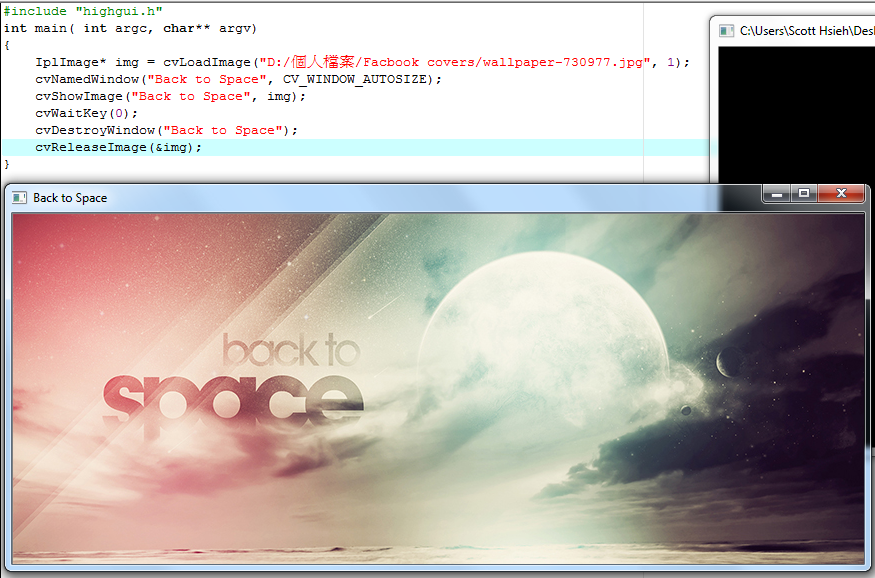
使用範例:

 1
 2
 3
 4
 5
 6
 7
 8
 9
10
#include "highgui.h"
int main( int argc, char** argv) 
{
    IplImage* img = cvLoadImage("D:/個人檔案/Facbook covers/wallpaper-730977.jpg", 1);
    cvNamedWindow("Back to Space", CV_WINDOW_AUTOSIZE);
    cvShowImage("Back to Space", img);
    cvWaitKey(0);
    cvDestroyWindow("Back to Space");
    cvReleaseImage(&img);
}